Configuration Promotion
Self-Service Promotion Best Practices
ETQ Reliance is a configurable platform where customers can apply configuration changes to meet their business processes. ETQ provides customers with the three environments below to meet the validation requirements.
DEV: This environment is used to develop configuration changes per requirements.
TEST: The TEST environment, or QA or VAL, is used to validate or test the configuration changes before promoting them to PROD.
PROD: This environment holds the live system's customer data. Configuration changes are promoted to PROD after being validated or tested on the TEST environment.
If something were to go wrong in any of these environments due to configuration changes, there is no way to roll back the changes unless you take configuration backups before applying configuration changes or promotion files.
We recommend following the self-service promotion workflow below to restore your environment to a previous state when having broken configuration issues.
Self-service Promotion Process
The process below assumes that the above three environments have the same configuration.
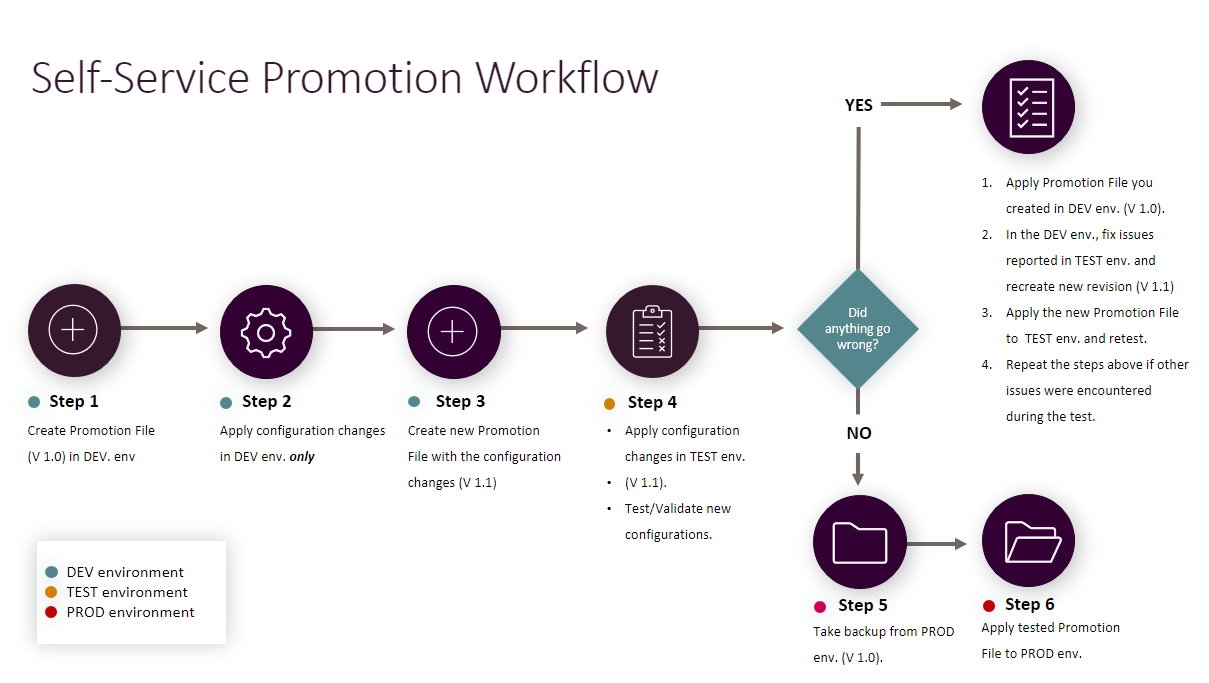
Step 1: Create a backup for the application to be configured from the DEV environment.
Before starting the self-service promotion process, create a promotion file for the application to be modified in the DEV environment and keep it as a configuration backup. Give your backup promotion file a version such as V 1.0.
Step 2: Apply your configuration changes on the DEV environment, and only in the DEV environment.
Remember that you can restore the configuration backup you created to the DEV environment and restart the process if anything goes wrong.
Step 3: Create a new promotion file version with the configuration changes.
Once you are done with your DEV configurations, create a promotion file with an increased version number (e.g., V 1.1).
Step 4: Apply the new configuration file version to the TEST environment and test the configuration changes.
Apply the new configuration file you created from the DEV environment to the TEST environment (i.e., V 1.1). Test/Validate the new configurations in the TEST environment. If something goes wrong,
-
Apply the promotion backup you created from the DEV environment (i.e., V 1.0).
-
Return to the DEV environment, fix the issues reported from the TEST environment, and recreate a new revision of the Promotion file with the configuration changes and fixes to issues reported from the TEST environment. (i.e., V 1.1).
-
Apply the new promotion file to the TEST environment and retest.
-
Repeat the steps above if other issues are encountered during the test.
Step 5: Take a backup Promotion File from the PROD environment.
The Promotion backup you create from the PROD environment should match the backup promotion file you created from the DEV environment (i.e., V 1.0). It is possible to request a DB backup, but this service has a fee.
Step 6: Apply to tested Promotion file to the PROD environment.
Apply the tested promotion file (V 1.1) and test. If you decide to roll back the changes:
Apply the promotion backup you created in Step 5.
-
Return to the DEV environment, fix the issues reported from the PROD environment, and recreate a new revision of the Promotion file with the configuration changes and fixes to issues reported from the DEV environment. (i.e., V 1.1).
-
Apply the new promotion file to the TEST environment and retest.
-
Apply the new promotion file to the PROD environment and retest.
-
Repeat the steps above if other issues are encountered during the test.
|
|
|